|
123456789101112131415161718192021222324252627282930313233343536373839404142434445464748495051525354555657585960616263646566676869707172737475767778798081828384858687888990919293949596979899100101102103104105106107108109110111112113114115116117118119120121122123124125126127128129130131132133134135136137138139140141142143144145146147148149150151152153154155156157158159160161162163164165166167168169170171172173174175176177178179180181182183184185186187188189190191192193194195196197198199200201202203204205206207208209210211212213214215216217218219220221222223224225226227228229230231232233234235236237238239240241242243244245246247248249250251252253254255256257258259260261262263264265266267268269270271272273274275276277278279280281282283284285286287288289290291292293294295296297298299300301302303304305306307308309310311312313314315316317318319320321322323324325326327328329330331332333334335336337338339340341342343344345346347348349350351352353354355356357358359360361362363364365366367368369370371372373374375376377378379380381382383384385386387388389390391392393394395396397398399400401402403404405406407408409410411412413414415416417418419420421422423424425426427428429430431432433434435436437438439440441442443444445446447448449450451452453454455456457458459460461462463464465466467468469470471472473474475476477478479480481482483484485486487488489490491492493494495496497498499500501502503504505506507508509510511512513514515516517518519520521522523524525526527528529530531532533534535536537538539540541542543544545546547548549550551552553554555556557558559560561562563564 |
- Plop
- ======
-
- Micro-generator framework that makes it easy for an entire team to create files with a level of uniformity.
- 
-
- > [Documentation also available on plopjs.com](https://plopjs.com/documentation/)
-
- # Getting Started
- [](https://www.npmjs.com/package/plop)
-
- [](https://www.npmjs.com/package/plop)
-
- [](https://join.slack.com/t/plopjs/shared_invite/zt-ehh69el1-2_DjgZRuMbpC9RnEa4M8cA)
-
- ## What is Plop?
- Plop is what I like to call a "micro-generator framework." Now, I call it that because it is a small tool that gives you a simple way to generate code or any other type of flat text files in a consistent way. You see, we all create structures and patterns in our code (routes, controllers, components, helpers, etc). These patterns change and improve over time so when you need to create a NEW *insert-name-of-pattern-here*, it's not always easy to locate the files in your codebase that represent the current "best practice." That's where plop saves you. With plop, you have your "best practice" method of creating any given pattern in CODE. Code that can easily be run from the terminal by typing `plop`. Not only does this save you from hunting around in your codebase for the right files to copy, but it also turns "the right way" into "the easiest way" to make new files.
-
- If you boil plop down to its core, it is basically glue code between [inquirer](https://github.com/SBoudrias/Inquirer.js/) prompts and [handlebar](https://github.com/wycats/handlebars.js/) templates.
-
- > This documentation is a work in progress. If you have great ideas, I'd love to hear them.
-
- ## Installation
- ### 1. Add plop to your project
- ```
- $ npm install --save-dev plop
- ```
- ### 2. Install plop globally (optional, but recommended for easy access)
- ```
- $ npm install -g plop
- ```
- ### 3. Create a plopfile.js at the root of your project
- ``` javascript
- export default function (plop) {
- // create your generators here
- plop.setGenerator('basics', {
- description: 'this is a skeleton plopfile',
- prompts: [], // array of inquirer prompts
- actions: [] // array of actions
- });
- };
- ```
-
- > `export default` is only allowed in NodeJS inside "ESM" supported files.
- > To use this syntax, your `plopfile` must be either:
- > - An ESM .js file with type: "module" in package.json
- > - An ESM .mjs file with any type declared in package.json
- >
- > Alternatively, you can have a `plopfile` with `module.exports = function (plop)` instead.
- > For _this_ syntax, your `plopfile` must be either:
- > - A CommonJS .js file with type: "commonjs" in package.json
- > - A CommonJS .cjs file with any type declared in package.json
-
- ## Your First Plopfile
- A plopfile starts its life as a node module that exports a function which accepts the `plop` object as its first parameter.
-
- ``` javascript
- export default function (plop) {};
- ```
-
- The `plop` object exposes the plop API object which contains the `setGenerator(name, config)` function. This is the function that you use to (wait for it) create a generator for this plopfile. When `plop` is run from the terminal in this directory (or any sub-directory), a list of these generators will be displayed.
-
- Let's try setting up a basic generator to see how that looks.
-
- ``` javascript
- export default function (plop) {
- // controller generator
- plop.setGenerator('controller', {
- description: 'application controller logic',
- prompts: [{
- type: 'input',
- name: 'name',
- message: 'controller name please'
- }],
- actions: [{
- type: 'add',
- path: 'src/{{name}}.js',
- templateFile: 'plop-templates/controller.hbs'
- }]
- });
- };
- ```
-
- The *controller* generator we created above will ask us 1 question, and create 1 file. This can be expanded to ask as many questions as needed, and create as many files as needed. There are also additional actions that can be used to alter our codebase in different ways.
-
- ## Using Prompts
- Plop uses the [inquirer.js](https://github.com/SBoudrias/Inquirer.js) library to gather user data. A list of [prompt types](https://github.com/SBoudrias/Inquirer.js/#prompt-types) can be found on the inquirer official website.
-
- ## CLI Usage
- Once plop is installed, and you have created a generator, you are ready to run plop from the terminal. Running `plop` with no parameters will present you with a list of generators to pick from. You can also run `plop [generatorName]` to trigger a generator directly. If you did not install plop globally, you will need to setup an npm script to run plop for you.
-
- ```javascript
- // package.json
- {
- ...,
- "scripts": {
- "plop": "plop"
- },
- ...
- }
- ```
-
- ### Bypassing Prompts
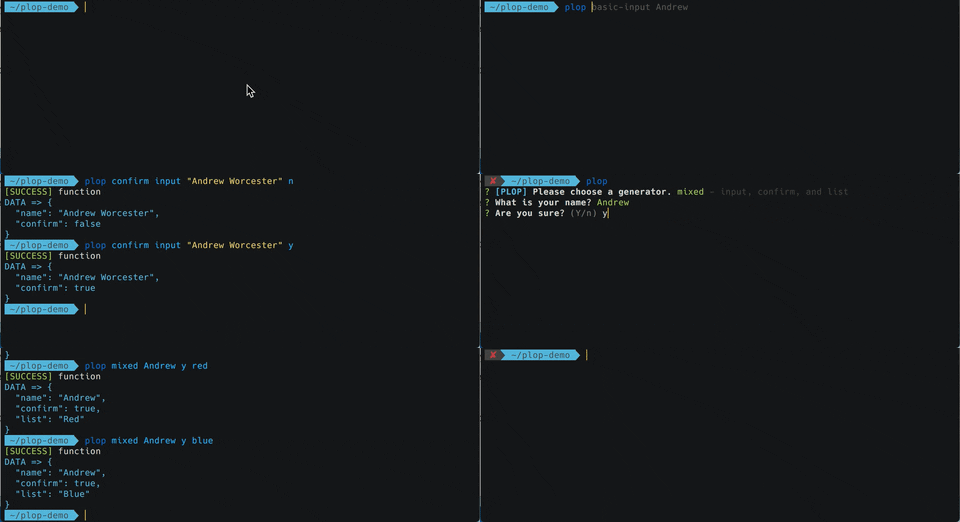
- Once you get to know a project (and its generators) well, you may want to provide answers to the prompts when you run the generator. If I have (for instance) a `component` generator that has one prompt (name), I can run that generator using `plop component "some component name"` and it will immediately execute as though I had typed "some component name" into the prompt. If that same generator had a second prompt, the same input would have resulted in the user being prompted for the second value.
-
- Prompts like `confirm` and `list` try to make sense of your input as best they can. For instance entering "y", "yes", "t", or "true" for a confirm prompt will result in a boolean `true` value. You can select items from a list using their value, index, key, or name. Checkbox prompts can accept a comma separated list of values in order to select multiples.
-
- 
-
- > If you want to provide bypass input for the second prompt but not the first, you can use an underscore "\_" to skip the bypass (ie `plop component _ "input for second prompt"`).
-
- Plop comes with bypass logic built-in for standard inquirer prompts, but there are also ways to provide custom logic for how to handle user input for a specific prompt.
-
- If you have published a 3rd party inquirer prompt plugin and would like to support bypass functionality for plop users out of the box, that is covered in [another section of this documentation](#3rd-party-prompt-bypass).
-
- ### Bypassing Prompts (by Name)
- You can also bypass prompts by name using `--` and then providing arguments for each prompt that you'd like to bypass. Examples [below](#bypass-examples).
-
- #### Bypass Examples
- ```
- ## Bypassing both prompt 1 and 2
- $ plop component "my component" react
- $ plop component -- --name "my component" --type react
-
- ## Bypassing only prompt 2 (will be prompted for name)
- $ plop component _ react
- $ plop component -- --type react
- ```
-
- ### Running a Generator Forcefully
- By default Plop actions keep your files safe by failing when things look fishy. The most obvious example of this is not allowing an [`add`](#add) action to overwrite a file that already exists. Plop actions individually support the `force` property but you can also use the `--force` flag when running Plop from the terminal. Using the `--force` flag will tell every action to run forcefully. With great power...🕷
-
- ## Why Generators?
- Because when you create your boilerplate separate from your code, you naturally put more time and thought into it.
-
- Because saving your team (or yourself) 5-15 minutes when creating every route, component, controller, helper, test, view, etc... [really adds up](https://xkcd.com/1205/).
-
- Because [context switching is expensive](https://www.petrikainulainen.net/software-development/processes/the-cost-of-context-switching/) and saving time is not the only [benefit to automating workflows](https://kentcdodds.com/blog/automation)
-
- # Plopfile API
- The plopfile api is the collection of methods that are exposed by the `plop` object. Most of the work is done by [`setGenerator`](#setgenerator) but this section documents the other methods that you may also find useful in your plopfile.
-
- ## TypeScript Declarations
-
- `plop` bundles TypeScript declarations. Whether or not you write your plopfile in TypeScript, many editors will offer code assistance via these declarations.
-
- ```javascript
- // plopfile.ts
- import {NodePlopAPI} from 'plop';
-
- export default function (plop: NodePlopAPI) {
- // plop generator code
- };
- ```
-
- ```javascript
- // plopfile.js
- export default function (
- /** @type {import('plop').NodePlopAPI} */
- plop
- ) {
- // plop generator code
- };
- ```
-
- ## Main Methods
- These are the methods you will commonly use when creating a plopfile. Other methods that are mostly for internal use are list in the [other methods](#other-methods) section.
-
- Method | Parameters | Returns | Description
- ------ | ---------- | ------- | -----------
- [**setGenerator**](#setgenerator) | *String, [GeneratorConfig](#interface-generatorconfig)* | *[PlopGenerator](#interface-plopgenerator)* | setup a generator
- [**setHelper**](#sethelper) | *String, Function* | | setup handlebars helper
- [**setPartial**](#setpartial) | *String, String* | | setup a handlebars partial
- [**setActionType**](#setactiontype) | *String, [CustomAction](#functionsignature-custom-action)* | | register a custom action type
- [**setPrompt**](#setprompt) | *String, InquirerPrompt* | | registers a custom prompt type with inquirer
- [**load**](https://github.com/plopjs/plop/blob/main/plop-load.md) | *Array[String], Object, Object* | | loads generators, helpers and/or partials from another plopfile or npm module
-
- ## setHelper
- `setHelper` directly corresponds to the handlebars method `registerHelper`. So if you are familiar with [handlebars helpers](https://handlebarsjs.com/guide/expressions.html#helpers), then you already know how this works.
-
- ``` javascript
- export default function (plop) {
- plop.setHelper('upperCase', function (text) {
- return text.toUpperCase();
- });
-
- // or in es6/es2015
- plop.setHelper('upperCase', (txt) => txt.toUpperCase());
- };
- ```
-
- ## setPartial
- `setPartial` directly corresponds to the handlebars method `registerPartial`. So if you are familiar with [handlebars partials](https://handlebarsjs.com/guide/partials.html), then you already know how this works.
-
- ``` javascript
- export default function (plop) {
- plop.setPartial('myTitlePartial', '<h1>{{titleCase name}}</h1>');
- // used in template as {{> myTitlePartial }}
- };
- ```
-
- ## setActionType
- `setActionType` allows you to create your own actions (similar to `add` or `modify`) that can be used in your plopfiles. These are basically highly reusable [custom action function](#custom-action-function)s.
-
- ### *FunctionSignature* Custom Action
- Parameters | Type | Description
- ---------- | ---- | -----------
- **answers** | *Object* | Answers to the generator prompts
- **config** | *[ActionConfig](#interface-actionconfig)* | The object in the "actions" array for the generator
- **plop** | *[PlopfileApi](#plopfile-api)* | The plop api for the plopfile where this action is being run
-
- ``` javascript
- export default function (plop) {
- plop.setActionType('doTheThing', function (answers, config, plop) {
- // do something
- doSomething(config.configProp);
- // if something went wrong
- throw 'error message';
- // otherwise
- return 'success status message';
- });
-
- // or do async things inside of an action
- plop.setActionType('doTheAsyncThing', function (answers, config, plop) {
- // do something
- return new Promise((resolve, reject) => {
- if (success) {
- resolve('success status message');
- } else {
- reject('error message');
- }
- });
- });
-
- // use the custom action
- plop.setGenerator('test', {
- prompts: [],
- actions: [{
- type: 'doTheThing',
- configProp: 'available from the config param'
- }, {
- type: 'doTheAsyncThing',
- speed: 'slow'
- }]
- });
- };
- ```
-
- ## setPrompt
- [Inquirer](https://github.com/SBoudrias/Inquirer.js) provides many types of prompts out of the box, but it also allows developers to build prompt plugins. If you'd like to use a prompt plugin, you can register it with `setPrompt`. For more details see the [Inquirer documentation for registering prompts](https://github.com/SBoudrias/Inquirer.js#inquirerregisterpromptname-prompt). Also check out the [plop community driven list of custom prompts](https://github.com/plopjs/awesome-plop#inquirer-prompts).
-
- ``` javascript
- import autocompletePrompt from 'inquirer-autocomplete-prompt';
- export default function (plop) {
- plop.setPrompt('autocomplete', autocompletePrompt);
- plop.setGenerator('test', {
- prompts: [{
- type: 'autocomplete',
- ...
- }]
- });
- };
- ```
-
- ## setGenerator
- The config object needs to include `prompts` and `actions` (`description` is optional). The prompts array is passed to [inquirer](https://github.com/SBoudrias/Inquirer.js/#objects). The `actions` array is a list of actions to take (described in greater detail below)
-
- ### *Interface* `GeneratorConfig`
- Property | Type | Default | Description
- -------- | ---- | ------- | -----------
- **description** | *[String]* | | short description of what this generator does
- **prompts** | *Array[[InquirerQuestion](https://github.com/SBoudrias/Inquirer.js/#question)]* | | questions to ask the user
- **actions** | *Array[[ActionConfig](#interface-actionconfig)]* | | actions to perform
-
- > If your list of actions needs to be dynamic, take a look at [using a dynamic actions array.](#using-a-dynamic-actions-array)
-
- ### *Interface* `PlopGenerator`
- Property | Type | Default | Description
- -------- | ---- | ------- | -----------
- **runPrompts** | *Function* | | a function to run the prompts within a generator
- **runActions** | *Function* | | a function to run the actions within a generator
-
- > This interface also contains all properties from [GeneratorConfig](#interface-generatorconfig)
-
- ### *Interface* `ActionConfig`
- The following properties are the standard properties that plop handles internally. Other properties will be required depending on the *type* of action. Also take a look at the [built-in actions](#built-in-actions).
-
- Property | Type | Default | Description
- -------- | ---- | ------- | -----------
- **type** | *String* | | the type of action ([`add`](#add), [`modify`](#modify), [`addMany`](#addmany), [etc](#setactiontype))
- **force** | *Boolean* | `false` | performs the action [forcefully](#running-a-generator-forcefully) (means different things depending on the action)
- **data** | *Object / Function* | `{}` | specifies data that should be mixed with user prompt answers when running this action
- **abortOnFail** | *Boolean* | `true` | if this action fails for any reason abort all future actions
- **skip** | *Function* | | an optional function that specifies if the action should run
-
- > The `data` property on any `ActionConfig` can also be a `Function` that returns an `Object` or a `Function` that returns a `Promise` that resolves with an `Object`.
-
- > The `skip` function on any `ActionConfig` is optional and should return a string if the action should be skipped. The return value is the reason to skip the action.
-
- > Instead of an Action Object, a [function can also be used](#custom-action-function)
-
- ## Other Methods
- Method | Parameters | Returns | Description
- ------ | ---------- | ------- | -----------
- **getHelper** | *String* | *Function* | get the helper function
- **getHelperList** | | *Array[String]* | get a list of helper names
- **getPartial** | *String* | *String* | get a handlebars partial by name
- **getPartialList** | | *Array[String]* | get a list of partial names
- **getActionType** | *String* | *[CustomAction](#functionsignature-custom-action)* | get an actionType by name
- **getActionTypeList** | | *Array[String]* | get a list of actionType names
- **setWelcomeMessage** | *String* | | Customizes the displayed message that asks you to choose a generator when you run `plop`.
- **getGenerator** | *String* | *[GeneratorConfig](#interface-generatorconfig)* | get the [PlopGenerator](#interface-plopgenerator) by name
- **getGeneratorList** | | *Array[Object]* | gets an array of generator names and descriptions
- **setPlopfilePath** | *String* | | set the `plopfilePath` value which is used internally to locate resources like template files
- **getPlopfilePath** | | *String* | returns the absolute path to the plopfile in use
- **getDestBasePath** | | *String* | returns the base path that is used when creating files
- **setDefaultInclude** | *Object* | *Object* | sets the default config that will be used for this plopfile if it is consumed by another plopfile using `plop.load()`
- **getDefaultInclude** | *String* | *Object* | gets the default config that will be used for this plopfile if it is consumed by another plopfile using `plop.load()`
- **renderString** | *String, Object* | *String* | Runs the first parameter (*String*) through the handlebars template renderer using the second parameter (*Object*) as the data. Returns the rendered template.
-
- # Built-In Actions
- There are several types of built-in actions you can use in your [GeneratorConfig](#interface-generatorconfig). You specify which `type` of action (all paths are based on the location of the plopfile), and a template to use.
-
- > The `Add`, `AddMany` and `Modify` actions have an optional `transform` method that can be used to transform the template result before it is written to disk. The `transform` function receives the template result or file contents as a `string` and the action data as arguments. It must return a `string` or a `Promise` that resolves to a `string`.
-
- ## Add
- The `add` action is used to (you guessed it) add a file to your project. The path property is a handlebars template that will be used to create the file by name. The file contents will be determined by the `template` or `templateFile` property.
-
- Property | Type | Default | Description
- -------- | ---- | ------- | -----------
- **path** | *String* | | a handlebars template that (when rendered) is the path of the new file
- **template** | *String* | | a handlebars template that should be used to build the new file
- **templateFile** | *String* | | a path a file containing the `template`
- **skipIfExists** | *Boolean* | `false` | skips a file if it already exists (instead of failing)
- **transform** | *Function* | | [an optional function](#built-in-actions) that can be used to transform the template result before writing the file to disk
- **skip** | *Function* | | *inherited from [ActionConfig](#interface-actionconfig)*
- **force** | *Boolean* | `false` | *inherited from [ActionConfig](#interface-actionconfig)* (overwrites files if they exist)
- **data** | *Object* | `{}` | *inherited from [ActionConfig](#interface-actionconfig)*
- **abortOnFail** | *Boolean* | `true` | *inherited from [ActionConfig](#interface-actionconfig)*
-
- ## AddMany
- The `addMany` action can be used to add multiple files to your project with a single action. The `destination` property is a handlebars template that will be used to identify the folder that the generated files should go into. The `base` property can be used to alter what section of the template paths should be omitted when creating files. The paths located by the `templateFiles` glob can use handlebars syntax in their file/folder names if you'd like the added file names to be unique (example: `{{ dashCase name }}.spec.js`).
-
- Property | Type | Default | Description
- -------- | ---- | ------- | -----------
- **destination** | *String* | | a handlebars template that (when rendered) is the destination folder for the new files
- **base** | *String* | | the section of the path that should be excluded when adding files to the `destination` folder
- **templateFiles** | *[Glob](https://github.com/sindresorhus/globby#globbing-patterns)* | | glob pattern that matches multiple template files to be added
- **stripExtensions** | *[String]* | `['hbs']` | file extensions that should be stripped from `templateFiles` files names while being added to the `destination`
- **globOptions** | *[Object](https://github.com/sindresorhus/globby#options)* | | glob options that change how to match to the template files to be added
- **verbose** | *Boolean* | `true` | print each successfully added file path
- **transform** | *Function* | | [an optional function](#built-in-actions) that can be used to transform the template result before writing each file to disk
- **skip** | *Function* | | *inherited from [ActionConfig](#interface-actionconfig)*
- **skipIfExists** | *Boolean* | `false` | *inherited from [Add](#add)* (skips a file if it already exists)
- **force** | *Boolean* | `false` | *inherited from [ActionConfig](#interface-actionconfig)* (overwrites files if they exist)
- **data** | *Object* | `{}` | *inherited from [ActionConfig](#interface-actionconfig)*
- **abortOnFail** | *Boolean* | `true` | *inherited from [ActionConfig](#interface-actionconfig)*
-
- ## Modify
- The `modify` action can be used two ways. You can use a `pattern` property to find/replace text in the file located at the `path` specified, or you can use a `transform` function to transform the file contents. Both `pattern` and `transform` can be used at the same time (`transform` will happen last). More details on modify can be found in the example folder.
-
- Property | Type | Default | Description
- -------- | ---- | ------- | -----------
- **path** | *String* | | handlebars template that (when rendered) is the path of the file to be modified
- **pattern** | *RegExp* | _end‑of‑file_ | regular expression used to match text that should be replaced
- **template** | *String* | | handlebars template that should replace what was matched by the `pattern`. capture groups are available as $1, $2, etc
- **templateFile** | *String* | | path a file containing the `template`
- **transform** | *Function* | | [an optional function](#built-in-actions) that can be used to transform the file before writing it to disk
- **skip** | *Function* | | *inherited from [ActionConfig](#interface-actionconfig)*
- **data** | *Object* | `{}` | *inherited from [ActionConfig](#interface-actionconfig)*
- **abortOnFail** | *Boolean* | `true` | *inherited from [ActionConfig](#interface-actionconfig)*
-
- ## Append
- The `append` action is a commonly used subset of `modify`. It is used to append data in a file at a particular location.
-
- Property | Type | Default | Description
- -------- | ---- | ------- | -----------
- **path** | *String* | | handlebars template that (when rendered) is the path of the file to be modified
- **pattern** | *RegExp, String* | | regular expression used to match text where the append should happen
- **unique** | *Boolean* | `true` | whether identical entries should be removed
- **separator** | *String* | `new line` | the value that separates entries
- **template** | *String* | | handlebars template to be used for the entry
- **templateFile** | *String* | | path a file containing the `template`
- **data** | *Object* | `{}` | *inherited from [ActionConfig](#interface-actionconfig)*
- **abortOnFail** | *Boolean* | `true` | *inherited from [ActionConfig](#interface-actionconfig)*
-
- ## Custom (Action Function)
- The `Add` and `Modify` actions will take care of almost every case that plop is designed to handle. However, plop does offer custom action functions for the node/js guru. A custom action function is a function that is provided in the actions array.
- - Custom action functions are executed by plop with the same [CustomAction](#functionsignature-custom-action) function signature.
- - Plop will wait for the custom action to complete before executing the next action.
- - The function must let plop known what’s happening through the return value. If you return a `Promise`, we won’t start other actions until the promise resolves. If you return a message (*String*), we know that the action is done and we’ll report the message in the status of the action.
- - A custom action fails if the promise is rejected, or the function throws an `Exception`
-
- _See the [example plopfile](https://github.com/plopjs/plop/blob/main/packages/plop/tests/examples/javascript/plopfile.js) for a sample synchronous custom action._
-
- ## Comments
- Comment lines can be added to the actions array by adding a string in place of an action config object. Comments are printed to the screen when plop comes to them and have no functionality of their own.
-
- # Built-In Helpers
- There are a few helpers that I have found useful enough to include with plop. They are mostly case modifiers, but here is the complete list.
-
- ## Case Modifiers
- - **camelCase**: changeFormatToThis
- - **snakeCase**: change_format_to_this
- - **dashCase/kebabCase**: change-format-to-this
- - **dotCase**: change.format.to.this
- - **pathCase**: change/format/to/this
- - **properCase/pascalCase**: ChangeFormatToThis
- - **lowerCase**: change format to this
- - **sentenceCase**: Change format to this,
- - **constantCase**: CHANGE_FORMAT_TO_THIS
- - **titleCase**: Change Format To This
-
- ## Other Helpers
- - **pkg**: look up a property from a package.json file in the same folder as the plopfile.
-
- # Taking it Further
-
- There is not a lot needed to get up and running on some basic generators. However, if you want to take your plop-fu further, read on young padawan.
-
- ## Using a Dynamic Actions Array
- Alternatively, the `actions` property of the [GeneratorConfig](#interface-generatorconfig) can itself be a function that takes the answers data as a parameter and returns the actions array.
-
- This allows you to adapt the actions array based on provided answers:
-
- ``` javascript
- export default function (plop) {
- plop.setGenerator('test', {
- prompts: [{
- type: 'confirm',
- name: 'wantTacos',
- message: 'Do you want tacos?'
- }],
- actions: function(data) {
- var actions = [];
-
- if(data.wantTacos) {
- actions.push({
- type: 'add',
- path: 'folder/{{dashCase name}}.txt',
- templateFile: 'templates/tacos.txt'
- });
- } else {
- actions.push({
- type: 'add',
- path: 'folder/{{dashCase name}}.txt',
- templateFile: 'templates/burritos.txt'
- });
- }
-
- return actions;
- }
- });
- };
- ```
-
- ## 3rd Party Prompt Bypass
- If you have written an inquirer prompt plugin and want to support plop's bypass functionality, the process is pretty simple. The plugin object that your prompt exports should have a `bypass` function. This `bypass` function will be run by plop with the user's input as the first parameter and the prompt config object as the second parameter. The value that this function returns will be added to the answer data object for that prompt.
-
- ``` javascript
- // My confirmation inquirer plugin
- export default MyConfirmPluginConstructor;
- function MyConfirmPluginConstructor() {
- // ...your main plugin code
- this.bypass = (rawValue, promptConfig) => {
- const lowerVal = rawValue.toString().toLowerCase();
- const trueValues = ['t', 'true', 'y', 'yes'];
- const falseValues = ['f', 'false', 'n', 'no'];
- if (trueValues.includes(lowerVal)) return true;
- if (falseValues.includes(lowerVal)) return false;
- throw Error(`"${rawValue}" is not a valid ${promptConfig.type} value`);
- };
- return this;
- }
- ```
- > For the above example, the bypass function takes the user's text input and turns it into a `Boolean` value that will be used as the prompt answer data.
-
- ### Adding Bypass Support to Your Plopfile
- If the 3rd party prompt plugin you are using does not support bypass by default, you can add the `bypass` function above to your prompt's config object and plop will use it for handling bypass data for that prompt.
-
- ## Wrapping Plop
-
- Plop provides a lot of powerful functionality "for free". This utility is so powerful, in fact, that you can even wrap `plop`
- into your own CLI project. To do so, you only need a `plopfile.js`, a `package.json`, and a template to reference.
-
- Your `index.js` file should look like the following:
-
- ```javascript
- #!/usr/bin/env node
- import path from "node:path";
- import minimist from "minimist";
- import { Plop, run } from "plop";
-
- const args = process.argv.slice(2);
- const argv = minimist(args);
-
- import { dirname } from "node:path";
- import { fileURLToPath } from "node:url";
-
- const __dirname = dirname(fileURLToPath(import.meta.url));
-
- Plop.prepare({
- cwd: argv.cwd,
- configPath: path.join(__dirname, 'plopfile.js'),
- preload: argv.preload || [],
- completion: argv.completion
- }, env => Plop.execute(env, run));
- ```
-
- And your `package.json` should look like the following:
-
- ```json
- {
- "name": "create-your-name-app",
- "version": "1.0.0",
- "main": "index.js",
- "scripts": {
- "start": "plop",
- },
- "bin": {
- "create-your-name-app": "./index.js"
- },
- "preferGlobal": true,
- "dependencies": {
- "plop": "^3.0.0"
- }
- }
- ```
-
- ### Setting the base destination path for the wrapper
-
- When wrapping plop, you might want to have the destination path to be based on the cwd when running the wrapper. You can configure the `dest` base path like this:
-
- ```javascript
- Plop.prepare({
- // config like above
- }, env =>
- Plop.execute(env, (env) => {
- const options = {
- ...env,
- dest: process.cwd() // this will make the destination path to be based on the cwd when calling the wrapper
- }
- return run(options, undefined, true)
- })
- )
- ```
-
- ### Adding General CLI Actions
-
- Many CLI utilities handle some actions for you, such as running `git init` or `npm install` once the template is generated.
-
- While we'd like to provide these actions, we also want to keep the core actions limited in scope. As such, we maintain a collection of libraries built to add these actions to Plop in [our Awesome Plop list](https://github.com/plopjs/awesome-plop). There, you'll be able to find options for those actions, or even build your own and add it to the list!
-
- ### Further Customization
-
- While `plop` provides a great level of customization for CLI utility wrappers, there may be usecases where you simply
- want more control over the CLI experience while also utilizing the template generation code.
-
- Luckily, [`node-plop`](https://github.com/plopjs/node-plop/) may be for you! It's what the `plop` CLI itself is built
- upon and can be easily extended for other usage in the CLI. However, be warned, documentation is not quite as fleshed out
- for integration with `node-plop`. That is to say `Thar be dragons`.
-
- > We note lackluster documentation on `node-plop` integration not as a point of pride, but rather a word of warning.
- > If you'd like to contribute documentation to the project, please do so! We always welcome and encourage contributions!
|

